Desktop Point of Sale
HARDWARE STORE POS
Counter / Stock / Credit / Reports
An offline-first point-of-sale and back-office system for a hardware store — keyboard-driven billing, stock sold by the bag, metre and kilo, customer credit and seventeen owner reports.
.webp&w=3840&q=75)
Swipe to see more →
01
Hardware Store Point of Sale
A point-of-sale and back-office system for a hardware store. Pipes, fittings, cement, paint, wire and fasteners are sold across the counter, often by weight or length, and most of the products have no barcode.
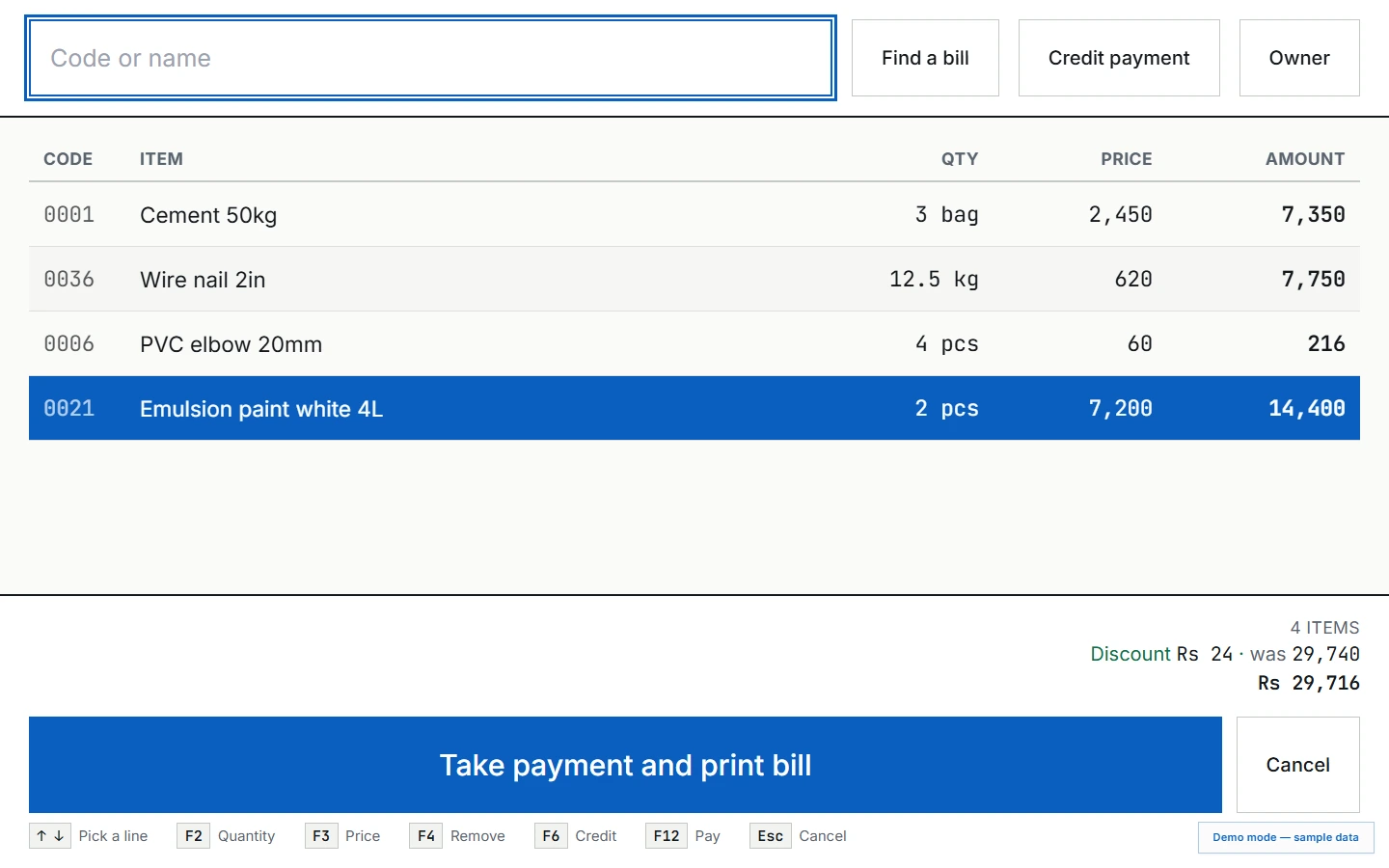
The till is built around the people who use it all day: every sale can be completed from the keyboard, each product has a short numeric code, and the counter screens never show a cost price or a delete button.
It runs on a single Windows machine and keeps trading with the internet down. The owner gets a separate, read-only dashboard on their phone, kept up to date in the background.
02
From the counter to the books
- Counter
- Search by name or four-digit code, code*quantity entry, per-line discounts, cash or credit payment, change due and bill printing.
- Products & stock
- Categories, units sold by the bag, metre or kilo, reorder levels, stock checks, shelf labels and weighted-average cost.
- Purchases & suppliers
- Delivery entry that updates stock and cost, past deliveries, supplier balances, payments and price comparison.
- Customer credit
- Credit limits, bills on account, payments against the balance, statements and who is late to pay.
- Reports
- Seventeen reports across sales, stock, money and suppliers, including profit and loss and stock valuation, with export and print.
- Close of day
- Count the till, see the day's cash and credit sales, and reconcile what should be in the drawer.
Live demo
Try it yourself
The real application running in your browser on a month of fictional trading. Owner PIN 4729, reports PIN 8156. Changes stay in your own browser; Reset demo in the corner restores the sample shop.
This is desktop software, built for a keyboard and a full-size screen. Open the demo on a laptop or desktop to try it.
Swipe to see more →
03
A sale without the mouse
- Find the item. Type part of the name or its code. Typing
0036*12adds twelve in one go. - Confirm quantity and discount. Enter moves through quantity, then a percentage discount, then back to search. Quantities like 12.5 kg or 3.2 m are exact.
- Take payment. F12 opens cash or credit, with quick amounts, the change due and rounding to the nearest rupee.
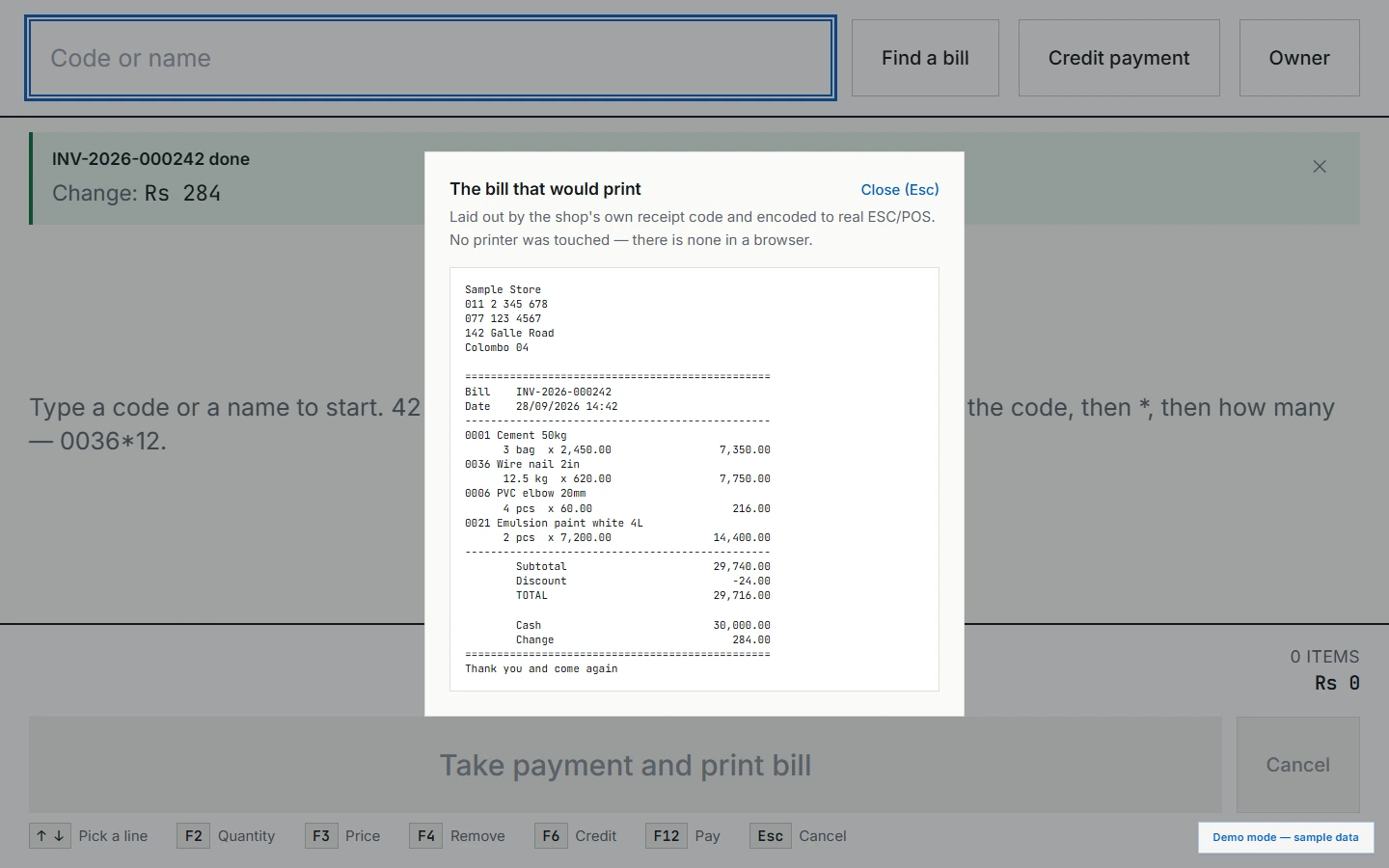
- Print the bill. An 80mm thermal receipt is laid out and encoded as ESC/POS. In the demo it appears on screen instead.
Swipe to see more →
04
The owner's side, behind a PIN
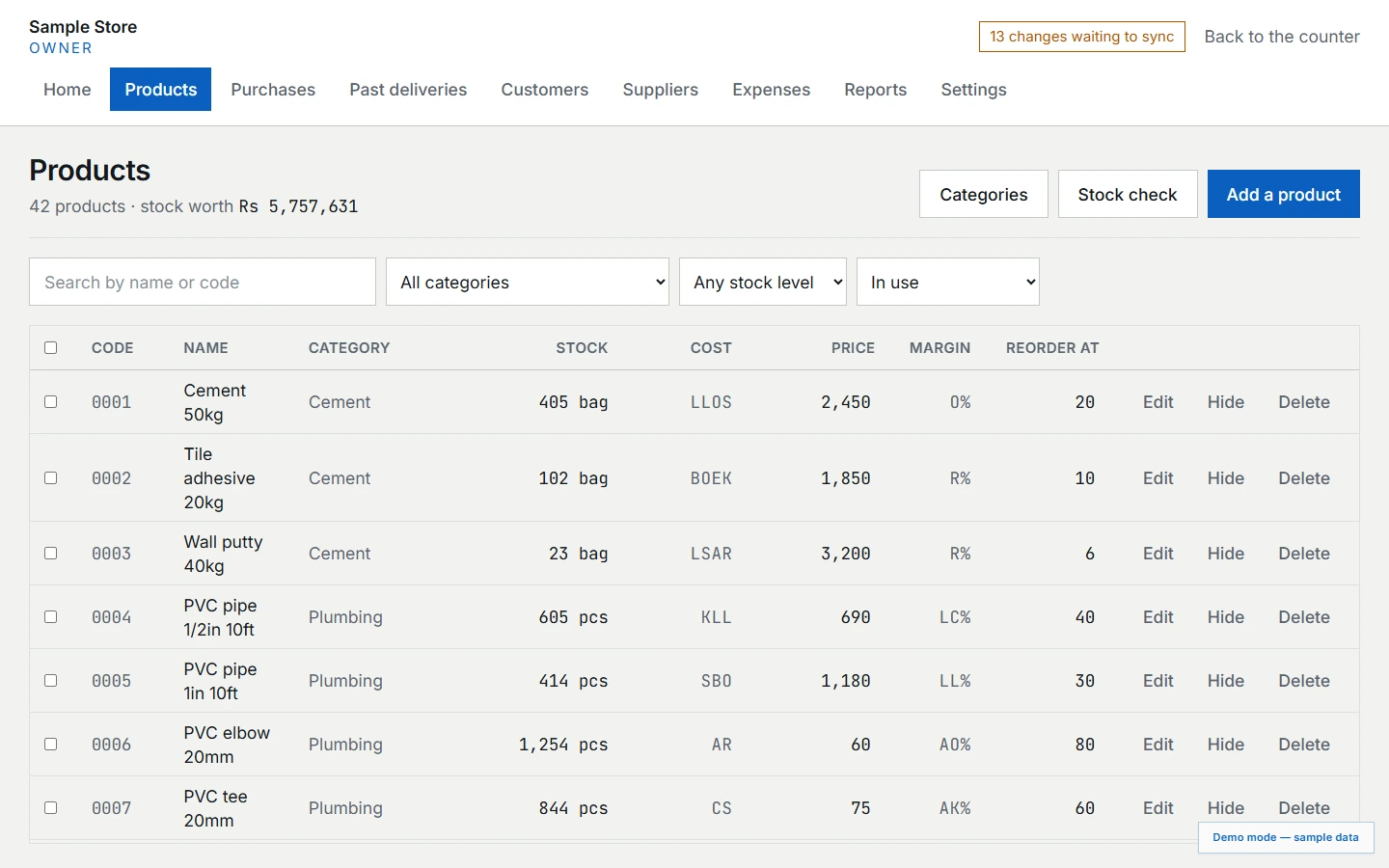
Owner mode holds products, purchases, suppliers, customers, expenses and settings. It is unlocked with a PIN and locks itself again after a period of inactivity.
Cost prices and margins are shown as letters from a code word, the way many shops mark costs on a price tag, so that a customer looking at the screen cannot read them. The database still stores exact numbers.
Also in owner mode
- Stock checks that record what the shelves actually hold
- Printable shelf labels with each product's code
- Supplier deliveries that update stock and the weighted-average cost
- Backups to a file, and a check that re-verifies the figures
Swipe to see more →
05
Seventeen reports, separately locked
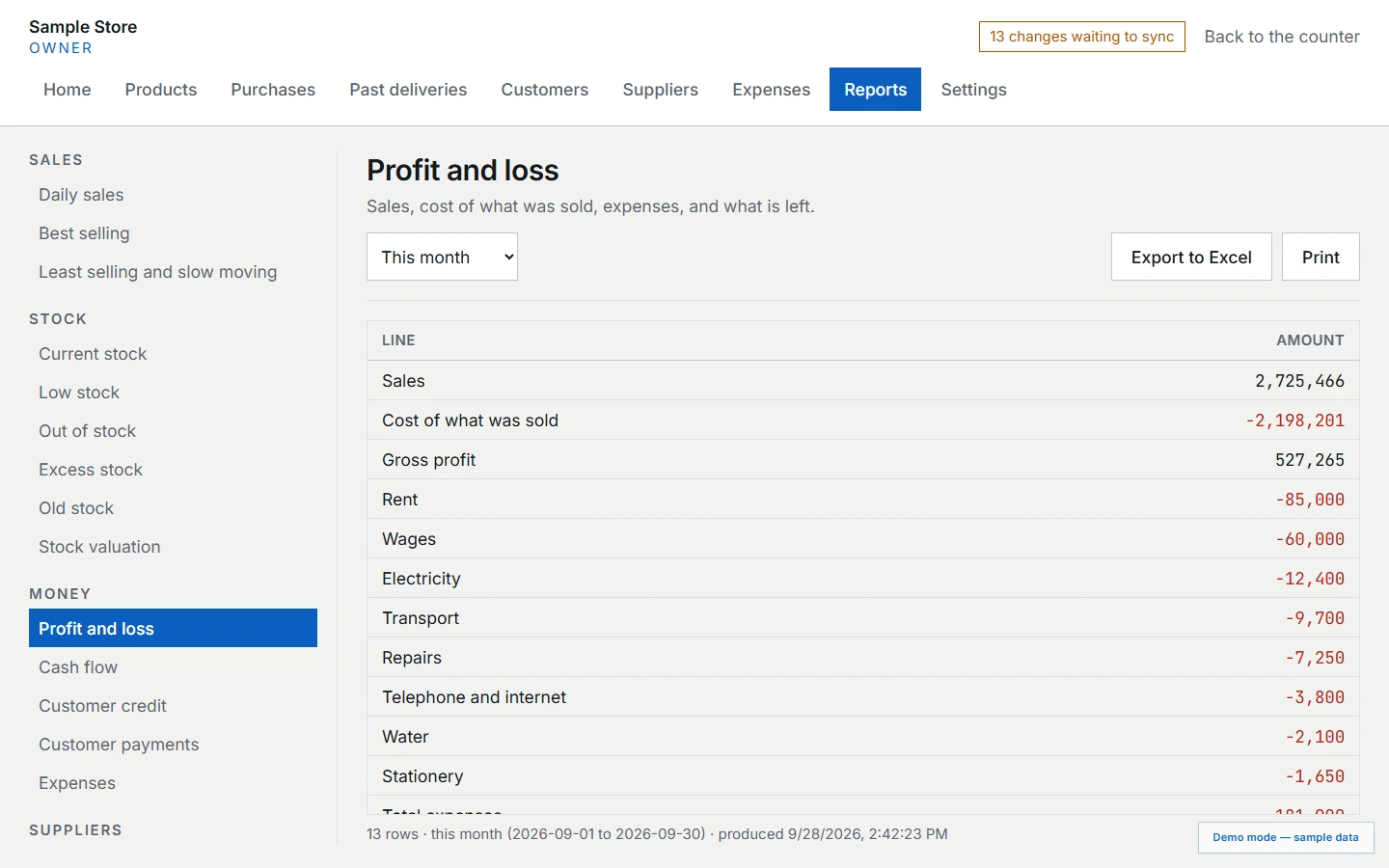
The owner PIN is shared with trusted counter staff so they can add a product. Profit, margin and cost of sales therefore sit behind a second PIN that shares no path with the first, asked for on every visit.
Reports
- Sales: daily sales, best selling, slow moving
- Stock: current, low, out of stock, excess, old stock and valuation
- Money: profit and loss, cash flow, customer credit and payments, expenses
- Suppliers: credit, payments and price comparison
06
Built so the numbers stay right
The desktop app is Electron, React and TypeScript over SQLite, with Drizzle and Zod schemas shared across the workspace. Money is stored as integer cents and quantities as integer thousandths, so there is no floating-point arithmetic anywhere near a price.
Every write is a transaction that also queues a sync record, so a sale that is not queued for the owner's dashboard cannot exist. Sync is one-way and runs in the background; the counter never waits on the network. Completed sales are never edited, only reversed by a return, and cost prices are captured on each sale line at the moment of sale.
The interface is available in English, Sinhala and Tamil. The shared business logic is covered by 286 automated tests.
- Application
- Offline-first Windows point of sale
- Access
- Counter, owner PIN and a separate reports PIN
- Companion
- Read-only owner dashboard for the phone
07
The same code, in a browser
The demo is not a mock-up. It runs the desktop app's own screens, repositories, reports and receipt layout against SQLite compiled to WebAssembly. A month of trading is generated through the same code on first load, so stock, costs and profit are calculated, not typed in.
Five platform modules are swapped for browser equivalents: the database connection, logging, printing, PIN hashing and the backup and sync edges. Printing shows the bill on screen, sync is simulated and makes no network requests, and “Back up now” downloads the real SQLite file.
The store, its customers, suppliers and prices are fictional. Changes are kept in your browser's storage only.
Next
More projects
- Web App
Car Wash Mobile
A field-service platform for a mobile car wash company — a scheduling board, per-vehicle work records, and a portal where clients see their own jobs.
Case study →Try the demo - Private iOS App
Mobile Wash Technicians
The iPhone app for Mobile Wash technicians: assigned jobs, vehicle registration, service photos and work-order completion. Delivered privately to the company's staff through Apple Business Manager.
Case study →Try the demo - Sales & Service Web App
Equipment Portal
An equipment sales and service portal connecting distributor pricing, compressor sizing, engineering calculations and fault diagnosis in one role-based workspace.
Case study →Try the demo - AI UGC Video Ads
Trusted Health Products
Creator-style video ads for a veteran-owned US natural health brand, made with AI-generated presenters. Eight vertical spots across its OraMD oral care, ReliefMD pain relief and Earth & Elm skin care lines.
Case study → - AI Product & Campaign Imagery
Gymanimal
Product and lifestyle imagery for the Summer Essentials drop from Gymanimal, a Dutch women's activewear brand: studio shots for every product page, plus campaign scenes across three colourways.
Case study → - AI Product & Lifestyle Imagery
LXG Society
Still-life and lifestyle imagery for LXG Society, a UK premium headwear brand: caps staged with classic cars, sport and studio props, then worn in cafés, cities and on the course.
Case study →
Let's build your project
Have something in mind? Book a free call, pick a time that works for you, and I'll send over a Google Meet link.
Available for new projects
Mohomed Rimzan
Discovery Call
Consultation for web design and development. I'll review your project and answer your questions.
October 2026
Thu 8th
Your name and email are only used to arrange the call. Privacy
Step 1
Book a free call
I learn about your project, goals, and what you need. No strings attached.
Step 2
Get your proposal
Receive a scope and timeline within 24–48h. Clear pricing, no surprises.
Step 3
I build, you launch
I build in reviewed stages, then ship something that supports your goals.